Introduction: Which VPN Is Right for You?
Do you use public Wi-Fi? Are you looking for ways to improve your online privacy? Or do you want a VPN that creates an encrypted connection while you browse the internet?
Choosing the right VPN is not always easy. Many providers advertise security, fast speeds, and privacy, but their prices, features, and subscription terms can vary significantly.
In this guide, we explore three VPN services worth comparing in 2026, explain their potential benefits and limitations, and show you how to choose a service that fits your needs.
Quick answer: If you want a VPN with a broad range of features, NordVPN is worth evaluating. If you are looking for a free option, Proton VPN is worth considering. If you want to compare subscription options for connecting multiple devices, Surfshark is another service to investigate.
These are options to consider, not rankings based on hands-on testing by Hagaha. The best choice depends on your budget, devices, privacy requirements, and intended use.
1. What Is a VPN, and Why Do You Need One?
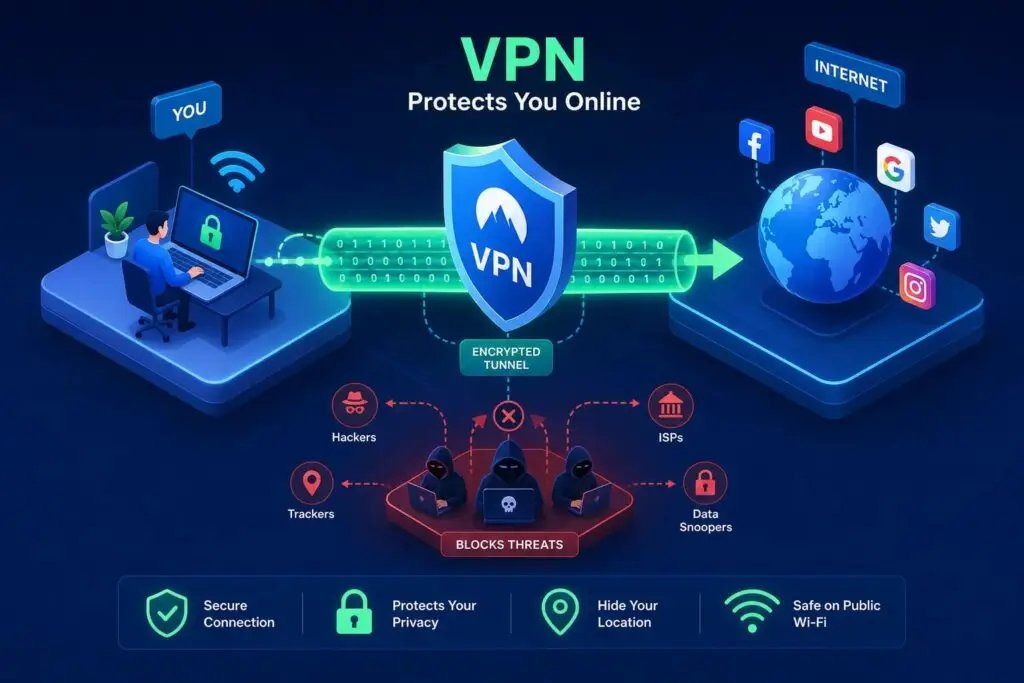
VPN stands for Virtual Private Network. It creates an encrypted connection between your device and a VPN server. Learn how a VPN works.
Depending on how you use it, a VPN may offer several benefits:
- Connection protection: Encryption can help protect data traveling between your device and the VPN server.
- IP address privacy: Websites will generally see the VPN server’s IP address instead of your regular public IP address.
- Public Wi-Fi protection: A VPN can add a layer of protection when you connect to Wi-Fi in public places.
- Different apparent locations: A VPN can change the apparent location of your internet connection, although it cannot guarantee access to every region-restricted service.
For more information about these benefits and limitations, see Proton VPN’s guide to what a VPN protects you from.
It is important to understand that a VPN does not make you completely anonymous online. You still need strong passwords, two-factor authentication, updated software, and caution when opening unfamiliar links or files.
2. Best VPN Services Worth Comparing
1. NordVPN — Best for Exploring a Broad Feature Set

NordVPN is a VPN service worth evaluating if you want a range of features and applications for different devices.
Potential advantages:
- A variety of VPN and security features.
- Applications for multiple operating systems.
- Different subscription plans to compare.
What to check before buying:
- The introductory price and renewal price.
- Which features are included in your chosen plan.
- The number of devices you can connect simultaneously.
- Refund terms and conditions.
Who should consider it?
Users who want to evaluate a VPN with a broad feature set and are willing to compare paid subscription plans.
Current pricing: Check the official website: NordVPN pricing and plans
2. Proton VPN — Best for Exploring a Free Option
Proton VPN is another service worth considering, particularly if you want to compare free and paid VPN plans.
Potential advantages:
- A free plan is available.
- Multiple subscription options.
- Privacy policies and security features that you can investigate before deciding.
What to check before buying or signing up:
- The limitations of the free plan.
- Available servers and features.
- Whether the plan supports your devices and intended use.
Who should consider it?
Users who want to explore a free VPN before deciding whether a paid subscription is necessary.
Pricing and plans: Proton VPN pricing and plans
3. Surfshark — Best for Comparing Multi-Device Plans

Surfshark is another service to compare with NordVPN and Proton VPN, especially when evaluating pricing, features, and device limits.
Potential advantages:
- Multiple subscription plans to compare.
- Applications for different devices.
- A range of VPN features to evaluate against your needs.
What to check before buying:
- The number of devices supported by your chosen plan.
- The total subscription cost and renewal price.
- The security features included in the plan.
- Refund terms and conditions.
Who should consider it?
Users who want another option to compare before choosing a VPN subscription.
Pricing and plans: Surfshark pricing and plans
3. VPN Comparison: NordVPN vs. Proton VPN vs. Surfshark
| Factor | NordVPN | Proton VPN | Surfshark |
|---|---|---|---|
| Main consideration | Broad feature set | Free-plan availability | Pricing and device support |
| Free plan | Check current offerings | A free option is available | Check current offerings |
| Paid plans | Yes | Yes | Yes |
| What to verify | Renewals and features | Free-plan limitations | Pricing and device limits |
| Best fit | Depends on your needs | Depends on your needs | Depends on your needs |
This table is a starting point for comparison, not the result of independent performance testing. Before publishing, verify current prices, features, and subscription terms using the NordVPN, Proton VPN, and Surfshark official pricing pages.
4. How to Choose the Best VPN
The best VPN is not the same for everyone. Consider the following factors before making a decision.
Security and Privacy
Read the provider’s privacy policy to understand what data it collects, how long it retains that data, and how it uses it.
Also, look for a clear explanation of its logging policy and whether independent audits are available to support its claims.
Internet Speed
A VPN can affect your internet speed. The result may depend on server location, distance, your device, your network connection, and the time of day.
If speed matters to you, look for tests that explain their methodology rather than relying solely on marketing claims.
Pricing and Renewals
Do not judge a subscription by its promotional price alone. Check the total amount charged upfront, the subscription period, and the renewal price.
If your budget is limited, a free plan that meets your needs may be more suitable than paying for features you will never use.
Device Compatibility
Check whether the VPN supports the devices you use, such as Windows computers, Android phones, and iPhones. Also, review how many devices can be connected under one subscription.
Customer Support
If you are new to VPNs, clear setup guides, a useful help center, and accessible customer support can make the service easier to use.
5. Free VPN vs. Paid VPN: Which Is Better?
Both free and paid VPN services can have benefits and limitations.
Free VPNs
A free VPN may suit users who need basic protection without a recurring subscription fee.
However, check for data limits, server restrictions, speed limitations, device compatibility, and available features. You should also investigate how the provider funds its service and what information it collects.
Paid VPNs
Paid services may offer additional features or fewer limitations, depending on the provider and subscription plan.
However, paying for a VPN does not automatically prove that it is more secure than every free alternative. You should still examine its privacy policy, service quality, and subscription terms.
6. Benefits and Limitations of Using a VPN
Potential Benefits
- Can help protect data traveling through an encrypted connection.
- Can hide your regular IP address from websites while connected to a VPN server.
- Can provide an additional layer of protection when using public Wi-Fi.
- Can change the apparent location of your internet connection.
Limitations
- May reduce internet speed.
- Some subscriptions require a substantial upfront payment.
- Providers differ in their privacy practices and available features.
- A VPN does not protect against every form of malware, phishing, or online fraud.
- Free plans may restrict server access, speeds, or other features.
For further explanation, see Proton VPN’s guide to VPN protection and Surfshark’s guide to what a VPN hides and does not hide.
7. Example: Which VPN Might Suit Your Needs?
Imagine you use an Android phone and a Windows computer and want to improve the privacy of your internet connection.
If you do not want to pay for a subscription, you could begin by investigating Proton VPN and reviewing the limitations of its free plan.
If you want additional features, you could compare the current plans offered by NordVPN and Surfshark.
If you regularly use public Wi-Fi, pay particular attention to privacy policies, encryption, and how the service handles your connection.
This is an illustrative decision-making example, not a claim that Hagaha tested these services in that specific situation.
8. How Hagaha Approaches VPN Comparisons
To help readers understand how recommendations are developed, articles of this type should explain how information was collected and evaluated.
A stronger review process could include:
- Researching each provider’s official documentation.
- Recording current prices, plans, and subscription terms.
- Testing speed, connectivity, and ease of use when access to the service is available.
- Documenting the devices and methods used during testing.
- Comparing at least two or three providers using consistent criteria.
- Updating the article when important information changes.
Important limitation: This sample article does not include performance results from tests conducted directly by Hagaha. We therefore do not claim to have measured these providers’ speeds or independently verified their performance.
9. Final Verdict: Which VPN Is Best in 2026?
If you are looking for a VPN, do not rush to choose the most popular service or the one with the most aggressive advertising.
NordVPN, Proton VPN, and Surfshark are three services you can start comparing. The right choice depends on your requirements, budget, devices, and privacy priorities.
- Consider researching NordVPN if you want to evaluate a service with a broad range of features.
- Consider researching Proton VPN if you want to start with a free option.
- Consider researching Surfshark if you want to compare subscription plans and multi-device support.
Before purchasing, review the subscription terms, renewal price, and privacy policy. The best decision is one based on your needs and verified information.
Frequently Asked Questions (FAQ)
Which VPN is the best in 2026?
There is no single VPN that is best for everyone. Compare privacy practices, features, pricing, speed, and your individual requirements before choosing.
Can I use a free VPN?
Yes. You can evaluate services that offer free plans, such as Proton VPN. Check their limitations and data policies before using them.
Does a VPN protect me from every online threat?
No. A VPN can help protect your connection, but it does not prevent every phishing attack, malware infection, scam, or threat caused by weak passwords.
Can a VPN make my internet faster?
A VPN adds another step to your internet connection and may affect speed. The result depends on the provider, server, and network you use.
What should I check before buying a VPN?
Review the total subscription cost, renewal price, privacy policy, included features, device support, and refund terms.
Affiliate Disclosure: Hagaha may earn a commission if you purchase a service through certain affiliate links in this article, at no additional cost to you. An affiliate relationship does not automatically mean a service is right for you. We encourage readers to compare providers and review their terms before making a decision.
Research and Testing Disclosure: This article is a research-based guide, not a report of hands-on testing. Pricing, features, and subscription terms should be verified through official sources before publication.
References
- NordVPN — Official pricing and plans
- Proton VPN — Official pricing and plans
- Surfshark — Official pricing and plans
- Proton VPN — How does a VPN work?
- Proton VPN — What does a VPN protect you from?
- Surfshark — What does a VPN hide and not hide?