Introduction: What Does a VPN Actually Do?
A virtual private network (VPN) creates an encrypted connection between your device and a VPN server operated by a VPN provider or your organization. When you connect to a VPN, your internet traffic travels through this protected connection before reaching its destination.
A simple way to understand this is to imagine sending a letter inside a sealed envelope. Someone handling the outer package may see where it is going, but should not be able to read the protected contents. A VPN uses encryption to help protect traffic traveling between your device and the VPN server.
When your traffic reaches the VPN server, the server forwards your request to the destination website or online service. Websites generally see the VPN server’s public IP address rather than your original public IP address.
This can improve connection privacy, reduce certain risks on public networks, and help you access company resources remotely. However, a VPN does not make you completely anonymous, prevent every cyberattack, or guarantee that every website will work through the connection.
Understanding what a VPN protects—and what it does not—is essential before choosing a service.
Key Takeaways
- Encryption: A VPN encrypts traffic between your device and the VPN server, helping protect it from people monitoring that part of the connection.
- IP address privacy: Websites generally see the VPN server’s public IP address instead of your original public IP address.
- Protocols: WireGuard, OpenVPN, and IKEv2/IPsec are common technologies used to establish and protect VPN connections.
- Public Wi-Fi: A VPN can add protection when using shared networks, although it does not eliminate every risk associated with public Wi-Fi.
- Privacy limitations: Your VPN provider becomes an important party you must trust. Websites can still track activity through accounts, cookies, and other methods.
- Performance: A VPN may reduce speed or increase latency. The impact depends on the server, protocol, device, network, and distance.
- Choosing a service: Review the provider’s privacy policy, independent audit reports, security features, pricing, and cancellation terms.
1. How Does a VPN Tunnel Encrypt Your Data?
When you browse the internet without a VPN, your device communicates with websites and online services through your internet provider and other network infrastructure. HTTPS already encrypts the contents of most modern website connections, but other information—such as destination IP addresses, connection timing, and traffic volume—may still be visible to certain parties.
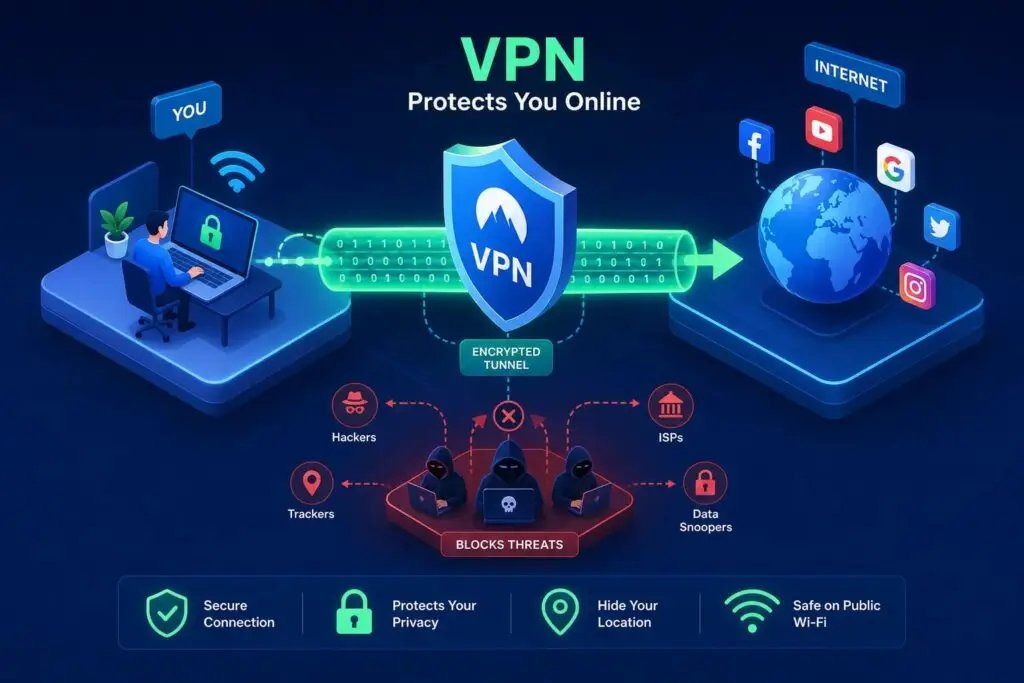
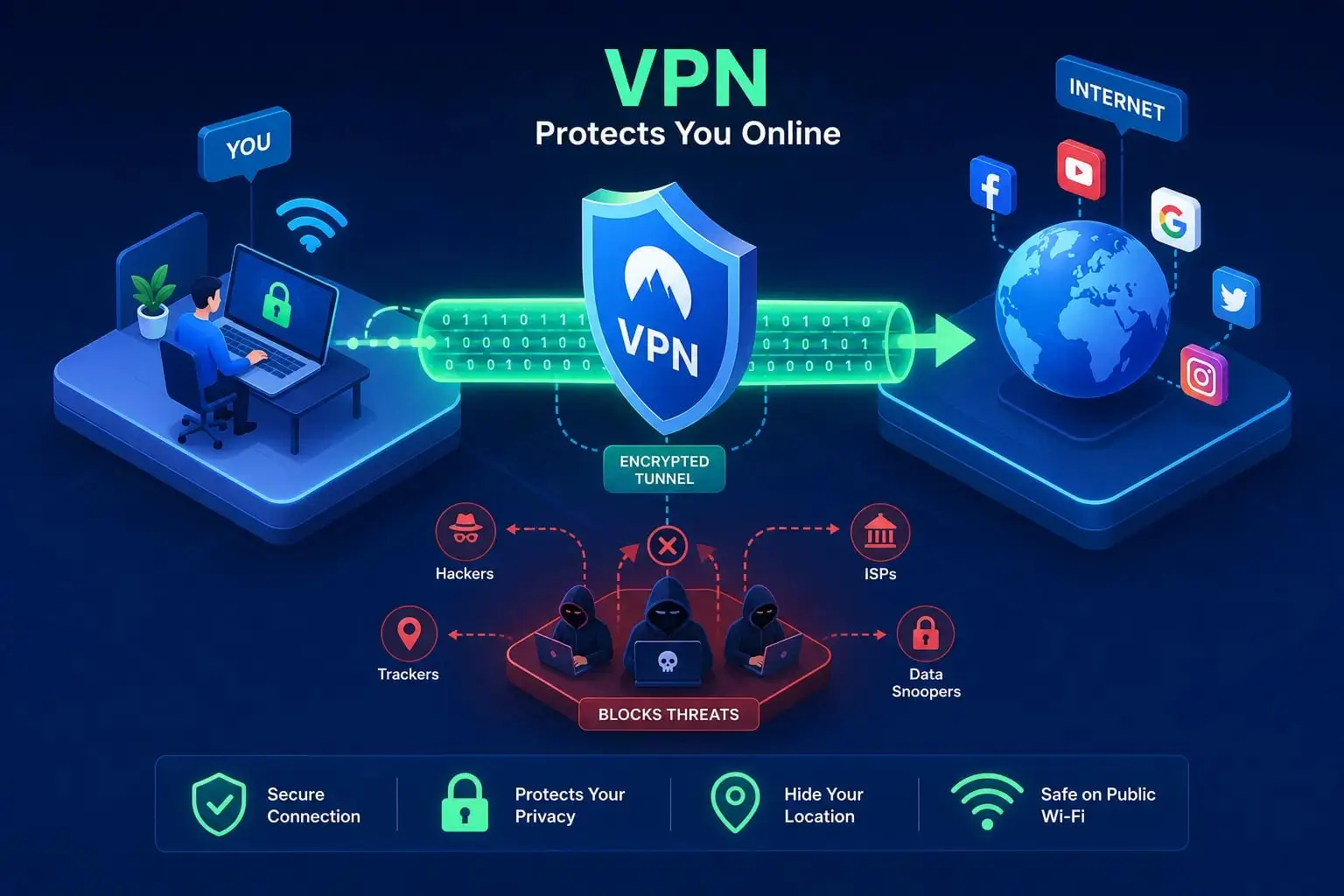
A VPN adds another layer of protection by creating an encrypted tunnel between your device and the VPN server.
Step 1: Your device establishes a VPN connection
When you open your VPN application and press Connect, the application communicates with the VPN server. The two sides authenticate the connection and negotiate the cryptographic settings and keys needed to protect the session.
The exact process depends on the VPN protocol being used.
Step 2: Your traffic is encrypted
After the connection is established, the VPN software encrypts the traffic it sends through the tunnel. The encrypted data is encapsulated inside packets that can travel across the internet to the VPN server.
Your internet provider can still see that your device is communicating with a VPN server. Depending on the network and protocol, some connection metadata may remain visible. However, the provider generally cannot read the contents protected by the VPN tunnel.
Step 3: The VPN server forwards your request
When the VPN server receives the protected packets, it decrypts the tunnel traffic and forwards your request to its intended destination.
If you visit a website, that website will generally see the VPN server’s public IP address instead of your original public IP address.
This does not necessarily hide your identity from the website. If you sign in to an account, use identifying information, or allow tracking technologies, the website may still recognize you.
Step 4: The response returns through the tunnel
The website sends its response back through the network. The VPN server routes the response through the VPN connection to your device, where the tunnel traffic is decrypted.
HTTPS remains important during this process. A VPN protects the connection to the VPN server, while HTTPS protects the connection between your browser and a website that supports HTTPS. These protections serve related but different purposes.
What does VPN encryption protect?
A properly configured VPN can help provide:
- Confidentiality: People monitoring the network between your device and the VPN server should not be able to read the encrypted tunnel contents.
- Integrity: Modern cryptographic protections can help detect unauthorized changes to protected data in transit.
- IP address privacy: Websites generally see the VPN server’s IP address rather than your original public IP address.
- Protection on shared networks: The VPN can reduce the ability of other people on the same local network to inspect the contents of traffic carried through the encrypted tunnel.
These benefits depend on correct configuration, reliable software, and the provider’s implementation. A VPN is one component of online security, not a complete security solution.
2. What Are VPN Protocols, and Why Do They Matter?
A VPN protocol defines how the connection is established, how data is transported, and how cryptographic protections are applied.
Different protocols make different design choices. Some prioritize a compact implementation, while others offer flexibility across networks and devices.
Three commonly encountered options are WireGuard, OpenVPN, and IKEv2/IPsec.
| Protocol | General characteristics | Potential advantages | Considerations |
|---|---|---|---|
| WireGuard | Modern VPN protocol using a compact design | Often efficient and fast; relatively small codebase | Uses UDP, which some restrictive networks may block |
| OpenVPN | Established VPN protocol supporting UDP and TCP transport | Flexible, widely supported, and configurable | Can use more resources or perform differently depending on configuration |
| IKEv2/IPsec | VPN connection establishment using IKEv2 with IPsec protection | Can work well on mobile devices and network changes | Performance and behavior depend on implementation and configuration |
No protocol is guaranteed to be the fastest or most secure in every situation. Implementation quality, software updates, cryptographic configuration, server load, and network conditions also matter.
WireGuard
WireGuard is a modern VPN protocol designed with a relatively compact codebase and contemporary cryptographic techniques.
Its design can make it efficient on supported devices. However, actual speed depends on the VPN provider’s implementation, the server you choose, your device, and your internet connection.
WireGuard uses UDP for transport. This can be efficient, but some restrictive networks block or limit UDP traffic.
OpenVPN
OpenVPN is an established, open-source VPN protocol with extensive configuration options and broad platform support.
It can operate over UDP or TCP. UDP is commonly chosen when performance is a priority, while TCP may be useful in some environments where UDP connections are restricted. TCP transport is not automatically better, and it does not guarantee that a VPN connection will bypass network restrictions.
IKEv2/IPsec
IKEv2 is used to establish and manage a VPN security association, while IPsec provides protection for IP traffic. Together, they are commonly described as IKEv2/IPsec.
This combination can be useful on mobile devices because supported implementations can handle changes between networks, such as switching from Wi-Fi to cellular data. Actual reconnection behavior depends on the operating system and VPN application.
Which VPN protocol should you choose?
For everyday use, a reputable VPN application’s recommended protocol is often a reasonable starting point.
If you experience connection problems, try another protocol supported by your provider. If you need a VPN for work, follow your organization’s security requirements rather than changing settings independently.
Protocol selection matters, but it should not be the only factor in deciding whether a VPN provider is trustworthy.
3. What Is Split Tunneling?
Split tunneling is a VPN feature that allows selected applications or traffic to use the VPN while other traffic uses your regular internet connection.
For example, you might configure a work application to connect through a VPN while allowing another application to connect directly.
This can be useful when a particular application does not work properly through the VPN or when you need to manage how different types of traffic use the connection.
However, there is an important trade-off: traffic excluded from the VPN does not receive the VPN tunnel’s protection. Your public IP address and network visibility for that traffic may differ from traffic routed through the VPN.
Split tunneling is not available in every VPN application or operating system, and its configuration can vary. Before using it, confirm which applications and connections are included or excluded.
4. When Does Using a VPN Make Sense?
A VPN can be useful in several situations, but its value depends on the risks you are trying to reduce.
Using public Wi-Fi
Airports, hotels, cafes, libraries, and other public locations may provide shared wireless networks. The security of these networks varies: some use encryption and appropriate access controls, while others may be poorly configured or exposed to malicious activity.
A VPN adds an encrypted connection between your device and the VPN server. This can reduce the ability of other people on the local network to inspect traffic carried through the tunnel.
However, a VPN does not make every public network safe. It cannot prevent all malicious access points, device vulnerabilities, phishing attempts, or malware infections.
When possible, use a trusted network or a personal mobile hotspot. Keep your device updated, use HTTPS websites, and avoid ignoring security warnings.
Limiting what your internet provider can see
Without a VPN, your internet provider can generally observe the IP addresses you connect to and may be able to infer the domains you visit. HTTPS usually protects the contents of your web sessions, but it does not necessarily hide all connection metadata.
When you use a VPN, your provider generally sees an encrypted connection to the VPN server rather than the individual destinations reached through the tunnel. Some metadata, including timing and traffic volume, may still be observable.
The VPN provider becomes an important party in this arrangement. You need to assess its privacy practices, technical controls, and logging policies.
Remote work and business access
Organizations often use VPNs to give employees secure access to internal applications, systems, and files.
A business VPN can establish an encrypted connection between an employee’s device and a company’s network. Depending on the configuration, it may allow access to resources that are not available to the general public.
Businesses may also use site-to-site VPNs to connect networks at different offices.
A VPN does not automatically make an entire business network secure. Organizations still need strong authentication, software updates, access restrictions, monitoring, and appropriate network segmentation.
Everyday browsing and location-sensitive services
A VPN can replace the public IP address websites see with the IP address of the VPN server. This may affect the approximate location associated with your connection.
Some users choose a VPN for privacy when browsing, but it is important to understand that websites can still identify users through logins, cookies, browser fingerprinting, payment information, and other signals.
Using a VPN to access region-specific content may also conflict with the terms of a particular streaming or online service. Availability is not guaranteed.
5. What Does a VPN Not Protect You From?
Understanding a VPN’s limitations is just as important as understanding its benefits.
A VPN does not make you completely anonymous
A VPN hides your original public IP address from the websites you visit in many ordinary configurations, but it does not erase your digital identity.
Websites may still recognize you through:
- Accounts you sign in to.
- Cookies and other tracking technologies.
- Browser fingerprinting.
- Information you enter into forms.
- Payment details and other identifying information.
A VPN should be understood as a privacy tool, not a guarantee of anonymity.
A VPN does not automatically prevent phishing or malware
A VPN encrypts traffic through the tunnel, but encryption alone does not establish whether a website or file is trustworthy.
If you enter your password on a fraudulent website, download a malicious file, or approve a deceptive login request, a VPN may not prevent the attack.
Use multifactor authentication, a password manager, updated software, and appropriate security tools. Be cautious with unexpected links, attachments, and requests for personal information.
A VPN shifts some trust to the VPN provider
When you use a VPN, your internet provider generally has less visibility into the destinations reached through the encrypted tunnel. The VPN provider, however, operates the server through which your traffic exits.
What the provider can observe or retain depends on the protocol, configuration, application behavior, and services you use. HTTPS continues to protect the contents of HTTPS sessions between your browser and the destination website.
A provider’s “no-logs” claim should be evaluated carefully. Read its privacy policy, look for clearly scoped independent audits, and check what the audit actually examined. An audit is useful evidence, but it is not a permanent guarantee that a service can never log information or suffer a security incident.
A VPN can still experience leaks or configuration problems
A VPN may fail to protect all traffic if it is misconfigured, loses its connection, or does not cover certain types of traffic.
Two terms you may encounter are DNS leaks and WebRTC leaks.
DNS leaks: DNS is used to translate domain names into IP addresses. If DNS requests travel outside the expected VPN path, a network operator or DNS resolver may learn which domains your device is looking up.
WebRTC leaks: WebRTC is a technology used for real-time communication in browsers. Depending on the browser, network setup, and VPN configuration, it may expose certain IP address information that users do not expect to reveal. The exact risk varies by implementation.
A properly configured VPN application should manage DNS traffic and routing as intended, but users who have specific privacy requirements should verify the behavior of their own setup.
What is a kill switch?
A kill switch is a VPN feature designed to block specified internet traffic if the VPN connection drops unexpectedly. Its purpose is to prevent the device from silently continuing over an unprotected connection.
The exact behavior varies by application and operating system. Some kill switches block all internet access until the VPN reconnects; others apply different rules.
Enable the feature if it suits your needs, and review the provider’s documentation to understand what traffic it blocks. Do not assume that the presence of a kill switch guarantees that every possible leak is prevented.
6. Will a VPN Slow Down Your Internet?
A VPN can reduce internet speed or increase latency, but the effect varies considerably.
Your results depend on factors such as:
- The speed and stability of your original internet connection.
- The distance between you and the VPN server.
- Server congestion and the provider’s network capacity.
- The VPN protocol and its implementation.
- Your device’s processing power.
- Your Wi-Fi quality and internet provider’s routing.
A nearby server on a reliable network may produce only a small change, while a distant or congested server may cause a much larger slowdown. There is no single percentage that accurately describes every VPN connection.
How to test your own VPN speed
You can estimate the impact by testing your connection under similar conditions:
- Run a speed test with the VPN turned off.
- Record your download speed, upload speed, and latency.
- Connect to a nearby VPN server.
- Repeat the same test on the same device.
- Run the tests more than once, preferably at different times.
- Compare the results and try another nearby server if performance is poor.
Do not treat a single test as a universal measure of the VPN provider’s performance. Network conditions change, and results from one location may not represent another country or internet provider.
For gaming and video calls, latency and connection stability can be as important as download speed. For large downloads and streaming, throughput may matter more.
7. Can a VPN Work With Streaming Services?
A VPN changes the public IP address associated with your connection, which can affect how some streaming platforms determine your approximate location.
However, streaming services may detect and block known VPN server addresses. Their policies, technical controls, and content availability can change over time.
A VPN may therefore work with one streaming service or server but fail with another. No provider can guarantee access to every platform, region, or title at all times.
Before choosing a VPN for streaming, check the provider’s current compatibility information and review the streaming service’s terms of use.
8. How Do You Choose a VPN Provider You Can Trust?
Choosing a VPN involves more than comparing advertised speeds or looking for the lowest price. A useful evaluation considers privacy, security, transparency, usability, and cost.
Check the privacy policy
Look for clear explanations of what information the provider collects, why it collects it, how long it retains it, and whether it shares data with third parties.
Pay attention to account information, connection metadata, diagnostic data, payment records, and information collected by optional features.
A short privacy policy is not necessarily a good one. What matters is whether its explanations are understandable, specific, and consistent with the service’s operation.
Look for independent security audits
Some VPN providers publish reports from independent security firms that assess specific parts of their systems or privacy claims.
Read the scope and date of the audit. Determine whether it examined server configurations, logging controls, applications, infrastructure, or only a limited component.
An audit provides evidence about what was assessed at a particular time. It does not guarantee that every part of the service is secure or that the provider will never change its practices.
Review the technical features
Consider whether the provider offers:
- Modern, well-supported VPN protocols.
- A kill switch appropriate to your device.
- DNS leak protection and sensible traffic routing.
- Apps for your operating systems.
- Clear guidance for configuring privacy features.
- Regular security updates and a way to contact support.
Split tunneling, multi-hop connections, and other advanced features may be useful for some users, but not everyone needs them.
Understand ownership and jurisdiction
Learn which company operates the service, where it is based, and which privacy and data-disclosure laws may apply.
Jurisdiction is one factor in assessing a provider, but it does not by itself prove that a VPN is trustworthy or untrustworthy. Technical design, corporate policies, legal obligations, and actual operating practices all matter.
Compare the full price
Check the amount charged at checkout, the length of the subscription, renewal pricing, taxes, cancellation procedures, and any refund conditions.
A low advertised monthly equivalent may require paying for a long subscription in advance. Compare the total cost rather than relying only on the largest discount shown in an advertisement.
Be careful when evaluating free VPNs
Some free VPN applications have been found to contain security weaknesses, expose data, request excessive permissions, or share information with third parties. However, free VPNs do not all operate the same way, and some offer limited but legitimate services.
Evaluate a free service using the same criteria as a paid provider. Read its privacy policy, examine its business model, check its permissions, and look for independent evidence about its security.
A paid subscription does not automatically guarantee privacy, just as a free service is not automatically unsafe.
9. A Practical VPN Security Checklist
Before relying on a VPN for sensitive browsing, consider the following checklist:
- Choose a provider with a clear and understandable privacy policy.
- Review independent audit reports and what they actually cover.
- Install the official application and keep it updated.
- Use a supported, secure protocol recommended by the provider.
- Understand whether the kill switch is enabled and how it behaves.
- Review DNS settings and any split tunneling rules.
- Continue using HTTPS websites and multifactor authentication.
- Avoid suspicious links, files, and login requests.
- Review subscription renewal, cancellation, and refund terms.
- Test your own connection if you need to verify speed or leak protection.
This checklist can help you make a more informed decision, but it cannot guarantee that a VPN is free of vulnerabilities.
10. Why Use a VPN Review Site Like Hagaha?
Comparing VPN providers can require reviewing technical documentation, privacy policies, audit reports, supported devices, pricing, and refund conditions.
Hagaha aims to make this research easier by publishing beginner-friendly guides and comparisons about VPNs and online security.
When evaluating our reviews, readers should distinguish between official claims made by providers, results reported by independent researchers, and hands-on tests actually performed by the reviewer. Clear sourcing and honest methodology help readers understand the strength and limitations of each conclusion.
If you are comparing services, start by identifying what matters most to you: everyday privacy, remote work, multiple devices, streaming compatibility, or budget. Then compare providers against those requirements instead of assuming that one service is best for every user.
The Bottom Line: Is a VPN Worth Using?
A VPN is a useful tool for protecting the connection between your device and a VPN server. It can help reduce the visibility of your traffic to other people on a local network, replace the public IP address websites see with the VPN server’s address, and provide secure access to private business resources.
However, it does not make you completely anonymous, stop every cyberattack, guarantee faster internet, or eliminate the need to trust a service provider.
The quality of the service depends on its technical implementation, privacy practices, reliability, and the way you configure and use it.
Before subscribing, compare providers’ privacy policies, security features, independent audit reports, supported devices, and total costs. Choose a service that fits your actual needs, and continue following good security practices even when the VPN is connected.
Frequently Asked Questions
Will a VPN noticeably slow down online gaming?
It can, but the impact depends on your internet connection, server distance, network conditions, and protocol. A VPN may increase latency, which can matter more than download speed in competitive games. Test a nearby server and compare latency and stability before deciding whether to keep the VPN enabled while gaming.
How can I check whether my VPN is leaking my IP address or DNS requests?
You can use reputable IP address, DNS leak, and WebRTC diagnostic tools to check what information your browser and connection reveal. Run the checks with the VPN disconnected and connected, and compare the results. The tests provide useful evidence, but they do not prove that every possible traffic leak has been eliminated. A properly configured kill switch and DNS protection can provide additional safeguards.
Will a VPN let me access region-specific streaming content?
A VPN may change the approximate location associated with your public IP address. However, streaming services may block VPN addresses, and their terms and content availability vary. Access is not guaranteed, so check the current policies of the services you use.
Is it safe to use a free VPN?
Some free VPNs provide legitimate services, but others have been found to have security weaknesses or questionable data practices. Review the provider’s privacy policy, permissions, business model, and independent security evidence. Do not assume that every free VPN is unsafe or that every paid VPN is trustworthy.
Does a VPN hide my browsing history from my internet provider?
A VPN generally prevents your internet provider from directly seeing the destinations reached through the encrypted tunnel in the same way it could without the VPN. However, the provider can still see that you are connecting to a VPN server and may observe connection timing and traffic volume. The VPN provider becomes another party whose privacy practices you need to evaluate.
Do I still need antivirus software if I use a VPN?
Yes, a VPN and antivirus software serve different purposes. A VPN protects traffic carried through its tunnel, while antivirus and other endpoint security tools help detect or block malicious files and activity on your device. Neither tool replaces software updates, safe browsing habits, strong passwords, and multifactor authentication.
Should I always leave my VPN switched on?
That depends on your privacy needs, device, network, and the services you use. Some people prefer to keep their VPN enabled on untrusted networks or during everyday browsing. Others may need to change settings when a particular application is incompatible. Understand your VPN’s routing, kill switch, and split tunneling behavior so that you know which traffic is protected.
Is WireGuard always better than OpenVPN?
No. WireGuard has a modern, compact design and can perform very well, but no protocol is best in every environment. OpenVPN supports flexible configurations and can operate over UDP or TCP. Your best option depends on your network, device, provider implementation, and security requirements.
Sources and Further Reading
The following sources provide additional technical information and context for this guide:
- WireGuard — Protocol and Cryptography: https://www.wireguard.com/protocol/ — technical details about WireGuard’s protocol and cryptographic design.
- OpenVPN — Network Protocol: https://build.openvpn.net/doxygen/network_protocol.html — documentation about OpenVPN packet structure and UDP/TCP transport.
- National Security Agency — Securing Wireless Devices in Public Settings: https://www.nsa.gov/Press-Room/News-Highlights/Article/Article/2711968/nsa-issues-guidance-on-securing-wireless-devices-in-public-settings/ — security considerations and recommendations for public wireless networks.
- CISA — Modern Approaches to Secure Network Access: https://www.cisa.gov/sites/default/files/2024-06/joint-guide-modern-approaches-to-secure-network-access-security-508c.pdf — enterprise VPN benefits, limitations, and secure network access considerations.
- VPNrank — VPN Speed Test Results: https://vpnrank.io/vpn-speed-test — an example of benchmark results with stated test conditions and limitations.
- VPNrank — How We Test VPNs: https://vpnrank.io/how-we-test — explains its testing methodology and the limits of benchmark results.
- Top10VPN — Free VPN Investigations: https://www.top10vpn.com/research/free-vpn-investigations/ — research on security and privacy risks identified in some free VPN applications.
- Top10VPN — Free Android VPN Security Flaws: https://www.top10vpn.com/research/free-vpn-investigations/android-vpn-security-flaws/ — methodology and findings from testing a sample of free Android VPN apps.
Editorial and Methodology Note
This article is an educational guide based on technical documentation, security guidance, and published research. It does not claim that Hagaha independently tested every VPN protocol, provider, or application discussed here. Performance, feature availability, and privacy outcomes can vary by service, device, configuration, and network.
Readers should consult the original sources and current provider documentation before making decisions involving sensitive data or business systems. Update this article when important standards, security guidance, or the cited research changes.