Disclosure: Hagaha may earn a commission from some links on this site. This article currently contains no affiliate links. See our Affiliate Disclosure.
If you’re choosing a free AI note taker, “free” means very different things from one tool to the next:
- One tool gives you hundreds of transcription minutes a month.
- Another gives you a handful of AI summaries.
- A third gives full AI notes for your first ten meetings and then quietly trims them.
This guide compares the free plans only of six popular note takers. Every limit comes from the vendor’s own pricing page or help center, checked on October 30, 2026. Free plans change often, so treat the dates as part of the information.
What this article is and isn’t: a comparison of published free-plan terms. We have not yet run our own accuracy tests on these tools. Where testing would help, we say so. A testing checklist is at the end.
Quick comparison: free plan limits
| Tool | Free plan, main limit | Works with | Joins as a bot? | Paid plans start at |
|---|---|---|---|---|
| Otter.ai (Basic) | 300 transcription minutes per user per month; 30 minutes max per conversation; 3 lifetime file imports | Zoom, Microsoft Teams, Google Meet | Yes, the meeting assistant joins | Pro: $8.33/user/mo billed annually ($16.99 monthly) |
| Fireflies.ai (Free) | Small set of transcription credits on sign-up; 400 minutes of storage per seat; 20 AI credits per month | Video conferencing platforms via bot, Chrome extension, mobile app | Bot, or Chrome extension | See Fireflies pricing page (prices not shown in a machine-readable form when checked) |
| Fathom (Free) | “Unlimited recordings + transcriptions” and “Instant AI call summaries” per the pricing page | Not listed on the pricing page | “Bot-free (in beta) or bot capture” | Premium: $16/mo annually ($20 monthly) |
| tl;dv (Free) | Full AI notes for the first 10 meetings, then only the first 10 minutes of each meeting; limits are lifetime, not monthly | Zoom, Google Meet, Teams (product pages) | Yes | Pro: €18/seat/mo annually (EUR only on the page we checked) |
| Tactiq (Free) | 10 transcripts and 5 AI credits per month | Google Meet, Zoom, MS Teams via Chrome extension | No bot | Pro: $8/user/mo billed annually |
| Zoom My Notes (Basic) | AI note-taking 3 uses per month; meeting summaries for 3 hosted meetings per month; 40-minute meeting cap | Zoom, Teams, Google Meet and other platforms | No bots required | Standalone My Notes from $8.33/user/mo; Zoom Workplace paid from $14.16/user/mo |
Sources are linked in each section and listed under References.
How to choose: three questions that matter more than features
1. How many meetings do you record each month?
- Monthly-allowance plans (Otter’s 300 minutes, Tactiq’s 10 transcripts) suit people with a predictable, moderate load.
- tl;dv’s free limits are lifetime, not monthly. It is better for trying the product than for running a weekly meeting schedule for free.
2. Is a visible bot acceptable?
- Some clients and employers dislike a “notetaker” joining the participant list.
- Tactiq and Zoom’s My Notes advertise bot-free capture. Fathom offers a bot-free option in beta.
3. Do you need summaries, or just transcripts?
- Several free plans are generous with recording but strict with AI features. Fireflies is one example: credits for summaries and a monthly allowance of AI credits.
- If you mainly need a searchable transcript, look at the transcription allowance. If you need action items, look at the AI limits.
The tools in detail
Otter.ai: the most clearly defined monthly allowance
Otter’s Basic plan is free “forever”. According to Otter’s pricing page, it includes:
- 300 minutes per user per month, described as a shared pool across all transcription types.
- 30 minutes per conversation.
- 3 lifetime imports of audio or video files.
- Integrations listed on the Basic plan: Zoom, Microsoft Teams and Google Meet.
Good for: students, freelancers and anyone whose meetings are usually under half an hour. Watch out for: the 30-minute cap per conversation. A typical one-hour team meeting won’t be fully transcribed on the free plan.
Fireflies.ai: read the credit rules carefully
Fireflies’ Free plan help article describes a credit-based model:
- Transcription credits on sign-up: 3 for the website bot, 5 for the Chrome extension, 10 for new mobile users.
- Storage: 400 minutes per seat.
- AI credits: 20 per month for features such as its AskFred assistant.
- Languages: transcription in over 100.
- Downloads: downloading transcripts requires a paid plan.
The same help article also says auto-join “allows unlimited transcriptions on the Free plan” and that “3 meetings are included”. Those statements are hard to reconcile, and other Fireflies help pages list a different storage figure. Our advice: create a free account and check the usage meter in your own dashboard before relying on Fireflies for anything important.
Good for: people who want to try a mature, integration-heavy tool. Watch out for: the credit system, and paywalled transcript downloads.
Fathom: the most generous headline promise
Fathom’s pricing page lists the Free plan with “Unlimited recordings + transcriptions” and “Instant AI call summaries”. It also offers a choice of “bot-free (in beta) or bot capture”.
The pricing page does not state a monthly cap on AI summaries. Some third-party reviews report one, but we could not confirm it from an official Fathom source on the date we checked. Before committing, run a few meetings and see whether summaries keep arriving.
Good for: sales and customer calls where you want a summary after every call. Watch out for: confirming the summary limits yourself, as above.
tl;dv: generous recording, front-loaded AI
tl;dv’s help article on free-plan limits (updated November 24, 2025) explains:
- AI notes: your first 10 meetings get full AI notes. After that, only the first 10 minutes of each meeting.
- Lifetime limits: the limits apply to the account’s lifetime and do not reset monthly.
- Recording storage: recordings are kept for 3 months.
- Uploads: you can upload 5 files.
- Length: meetings can be up to 3 hours.
Good for: evaluating tl;dv before buying, or a team that mainly wants recordings and clips. Watch out for: expecting ongoing free AI summaries. They are a trial allowance in practice.
Tactiq: a lightweight, bot-free option
Tactiq’s pricing page lists the Free plan at 10 transcripts and 5 AI credits per month, “Free forever. No credit card.” Tactiq works as a Chrome extension for Google Meet, Zoom and Microsoft Teams, and its product pages describe transcription “with no bot”.
Good for: people who want a quiet live transcript without a participant joining the call. Watch out for:
- Ten transcripts a month goes quickly if you have daily standups.
- It depends on the Chrome browser.
Zoom’s My Notes: built-in, but tightly capped on free accounts
Zoom’s AI note-taking page describes My Notes Basic for free Zoom accounts:
- AI note taking: 3 uses per month.
- Meeting summaries: 3 hosted meetings per month.
- Free meetings capped at 40 minutes.
- Zoom says My Notes can take notes across Zoom, Teams, Google Meet and other platforms with no bots required.
Good for: occasional use by people who already live in Zoom. Watch out for: the small monthly allowance and the 40-minute meeting cap.
Before you press record: consent and privacy (US readers)
AI note takers record people, so the law matters.
The Reporters Committee for Freedom of the Press explains:
- Federal law sets a one-party consent minimum.
- About 11 states primarily require all-party consent. RCFP lists California, Delaware, Florida, Illinois, Maryland, Massachusetts, Michigan (with a nuance), Montana, New Hampshire, Pennsylvania and Washington.
- For calls that cross state lines, RCFP advises assuming the stricter law applies.
Practical habits that keep you on the right side of both the law and good manners:
- Announce the recording at the start of the meeting, even when the tool also shows a banner.
- Check your employer’s policy. Many companies restrict which AI tools may process meeting content.
- Don’t record sensitive conversations (health, legal, HR) on a free consumer plan without understanding where the data is stored.
- Read each vendor’s data-use terms. Several tools let you control whether your data is used to improve their models. Settings differ by plan.
This section is general information, not legal advice.
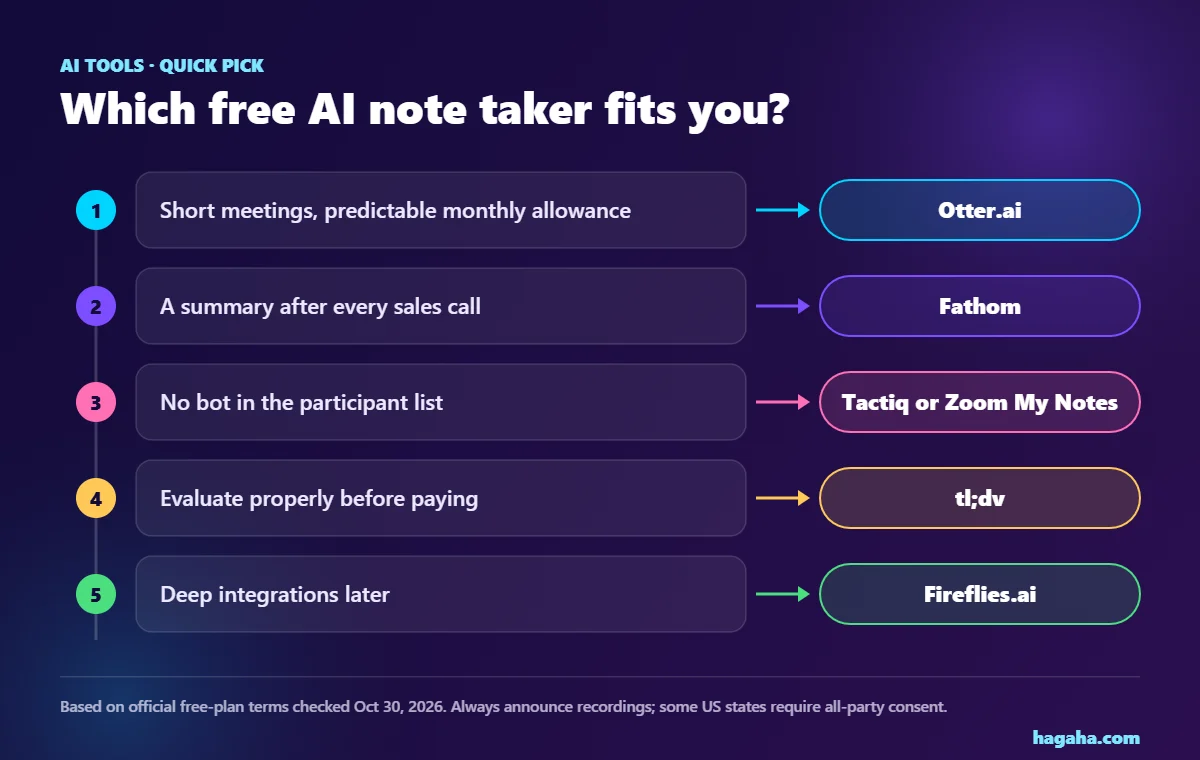
Which free AI note taker fits you?
| If you… | Start with | Why |
|---|---|---|
| Have short meetings and want a predictable monthly allowance | Otter.ai | 300 minutes/month, clearly documented |
| Want a summary after every sales call | Fathom | Free plan advertises unlimited recordings and summaries; verify the summary limits yourself |
| Don’t want a bot in the participant list | Tactiq or Zoom My Notes | Both advertise bot-free capture |
| Want to evaluate a tool properly before paying | tl;dv | Full AI notes for the first 10 meetings |
| Need deep integrations later | Fireflies.ai | Large integration catalogue; free plan useful for testing |
Who may not need any of these:
- If your meetings are mostly on Zoom and you rarely need summaries, the built-in allowance may be enough.
- If you need transcripts for legal or medical records, look for paid plans with the compliance terms your field requires, rather than a consumer free plan.
Frequently asked questions
Is there a completely free AI note taker with no limits? Not that we could verify. Every tool here limits something: minutes, meetings, AI credits, storage time or downloads. Fathom advertises unlimited recordings and transcriptions on its free plan, but check the AI-summary limits in your own account.
Which free AI note taker works with Google Meet? Otter.ai lists Google Meet on its Basic plan. Tactiq works in Google Meet through its Chrome extension. Zoom says My Notes works across Google Meet too.
Do AI note takers need everyone’s permission to record? It depends on the participants’ locations. Some US states require all parties to consent (see the RCFP guide above), so announcing the recording is the safest default.
Why do free plans change so often? AI transcription and summarisation cost vendors real computing money. Expect limits to tighten or shift, and re-check before you rely on a free plan.
Bottom line
- There is no single best free AI note taker. There is a best match for your meeting volume, your tolerance for bots, and whether you need summaries or just transcripts.
- Start with the tool whose free limit matches your actual week.
- Test it on one real meeting, then decide whether it’s worth paying for.
References (checked 2026-10-30)
- Otter.ai — Pricing. https://otter.ai/pricing (Basic plan: 300 min/month, 30 min/conversation, 3 lifetime imports; integrations; Pro pricing.)
- Fireflies.ai Help Center — “What’s included in the Fireflies Free plan”. https://guide.fireflies.ai/hc/en-us/articles/360020248438 (credits, 400-minute storage, 20 AI credits/month, downloads paid, 100+ languages.)
- Fathom — Pricing. https://fathom.ai/pricing (Free: unlimited recordings and transcriptions, instant AI summaries, bot-free beta; Premium $20 or $16/mo.)
- tl;dv Help Center — “What are the limits of the free plan” (updated 2025-11-24). https://intercom.help/tldv/en/articles/8919450-what-are-the-limits-of-the-free-plan
- tl;dv — Pricing (EUR). https://tldv.io/pricing/ (Pro €18/seat/month billed annually.)
- Tactiq — Pricing. https://tactiq.io/pricing (Free: 10 transcripts, 5 AI credits/month; Pro $8/user/mo annual.)
- Zoom — AI note taking / My Notes. https://www.zoom.com/en/products/ai-assistant/features/ai-note-taking (Basic: 3 uses/month, 3 summaries/month, 40-minute cap; pricing from $8.33 and $14.16.)
- Reporters Committee for Freedom of the Press — Introduction to the Reporter’s Recording Guide. https://www.rcfp.org/introduction-to-reporters-recording-guide/ (one-party federal floor; about 11 all-party states.)